
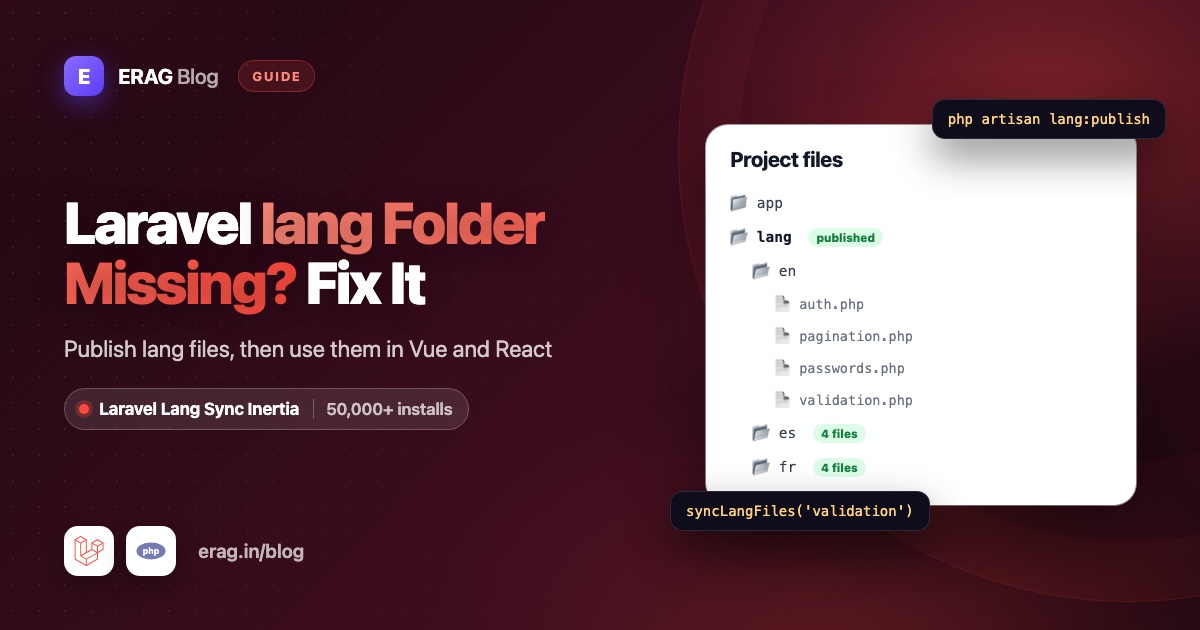
New Laravel apps have no lang folder because Laravel 11 removed it from the default skeleton, and Laravel 12 and 13 kept it that way. Run php artisan lang:publish to create lang/en/ with auth.php, pagination.php, passwords.php and validation.php; if your language files come from laravel-lang/lang, its lang:add command creates the folder too. Once the folder exists, Laravel Lang Sync Inertia sends those same files to your Inertia Vue, React or Svelte pages, so __('validation.required') works in your components exactly like it does in PHP.
Install it right after you publish the folder. It has more than 50,000 installs on Packagist:
composer require erag/laravel-lang-sync-inertia
npm install @erag/lang-sync-inertia
php artisan erag:install-lang
The short version
- Run
php artisan lang:publishto createlang/en. - Install Laravel Lang Sync Inertia with the three commands above.
- Check that
lang_pathinconfig/inertia-lang.phppoints at the folder Laravel uses. - In a middleware, set the locale and call
syncLangFiles()for the groups every page needs. - In a controller, call
syncLangFiles()for the groups only that page needs. - In Vue use
vueLang(), in React usereactLang(), and write__('validation.required', { attribute: 'email' }). - Optional: export everything to JSON once with
php artisan erag:generate-lang.
Why is the lang folder missing in Laravel 11, 12 and 13?
Laravel 11 slimmed down the files a new project starts with, and the Laravel docs now say the skeleton does not include a lang folder by default. Laravel 12 and 13 work the same way.
The translations still exist. The framework keeps English copies of its four files in vendor/laravel/framework/src/Illuminate/Translation/lang/en/, and Laravel's translation loader reads that folder first, then your app's lang folder. That is why validation errors already work in a fresh app.
That fallback only helps PHP. Your Vue and React components run in the browser, so they can't read PHP files at all, and they certainly can't reach into vendor. Laravel Lang Sync Inertia bridges that gap, but it reads real files from your project's lang folder. So publishing the folder is step one.
How do I create the lang folder?
Run this from your project root:
php artisan lang:publishYou get:
lang/
└── en/
    ├── auth.php
    ├── pagination.php
    ├── passwords.php
    └── validation.php
Good to know:
- It only publishes English. Other languages are folders you add next to
en. - It skips files that already exist.
--existingre-publishes only the files you have, and--forceoverwrites all four. Both replace your edits, so commit first. - It always writes to
lang/enin the project root, even if your app reads from an oldresources/langfolder. More on that next.
Which folder does Laravel Lang Sync Inertia read?
php artisan erag:install-lang created config/inertia-lang.php:
return [
    'lang_path' => base_path('lang'),
    'output_lang' => resource_path('js/lang'),
];
lang_path is the folder syncLangFiles() reads, and it defaults to lang in the project root, the same place lang:publish writes to. output_lang is where the JSON export goes (covered below).
Laravel itself picks its folder with one rule: if resources/lang exists, use it; otherwise use lang. Apps created before Laravel 9 often still have resources/lang, and even an empty one wins. Ask Laravel which folder it uses:
php artisan tinker --execute 'echo lang_path();'If it prints a path ending in resources/lang, either move everything into lang/ and delete the old folder, or tell the package to follow Laravel:
'lang_path' => lang_path(),Now Laravel and your Inertia pages always read the same files.
How do I share lang files with every Inertia page?
Put the text your layout and pages share in your own group file. You write these, one per language:
<?php

// lang/en/app.php
return [
    'invite' => [
        'title' => 'Invite a teammate',
        'email' => 'Email address',
        'send' => 'Send invite',
    ],
];<?php
// lang/es/app.php
return [
'invite' => [
'title' => 'Invita a un compañero',
'email' => 'Correo electrónico',
'send' => 'Enviar invitación',
],
];Then create a middleware that picks the language and shares the group:
php artisan make:middleware SetLocale<?php
namespace App\Http\Middleware;
use Closure;
use Illuminate\Http\Request;
use Illuminate\Support\Facades\App;
use Symfony\Component\HttpFoundation\Response;
class SetLocale
{
/**
* The languages this app supports.
*
* @var array<int, string>
*/
public const SUPPORTED = ['en', 'es'];
public function handle(Request $request, Closure $next): Response
{
$locale = $request->session()->get('locale', config('app.locale'));
App::setLocale(in_array($locale, self::SUPPORTED, true) ? $locale : config('app.locale'));
syncLangFiles('app');
return $next($request);
}
}Register it in bootstrap/app.php, before the Inertia middleware:
use App\Http\Middleware\SetLocale;

->withMiddleware(function (Middleware $middleware): void {
    $middleware->web(append: [
        SetLocale::class,
        HandleInertiaRequests::class,
    ]);
})
Keep the starter kit's other entries in that list. The order inside handle() matters: syncLangFiles() reads lang/{locale}/app.php for the locale that is active when you call it, so it must come after App::setLocale(). Call it once per request for each group. A language switcher only has to store es or en in the session; the multilingual Laravel Inertia app guide builds one.
How do I use validation messages in a Vue or React page?
Load bigger groups only on the pages that use them. Here an invite page needs validation.php for a quick check before the form is sent:
<?php

namespace App\Http\Controllers;

use Illuminate\Http\RedirectResponse;
use Illuminate\Http\Request;
use Inertia\Inertia;
use Inertia\Response;

class InviteController extends Controller
{
    public function create(): Response
    {
        syncLangFiles('validation');

        return Inertia::render('invites/Create');
    }

    public function store(Request $request): RedirectResponse
    {
        $request->validate(['email' => ['required', 'email']]);

        // Send the invite...

        return back();
    }
}// routes/web.php
use App\Http\Controllers\InviteController;
Route::get('/invites/create', [InviteController::class, 'create']);
Route::post('/invites', [InviteController::class, 'store']);The page now receives both groups, app from the middleware and validation from the controller. In Vue, create resources/js/pages/invites/Create.vue:
<script setup lang="ts">
import { vueLang } from '@erag/lang-sync-inertia/vue';
import { useForm } from '@inertiajs/vue3';

const { __ } = vueLang();
const form = useForm({ email: '' });

function submit(): void {
    form.clearErrors();

    if (form.email.trim() === '') {
        form.setError('email', __('validation.required', { attribute: 'email' }));

        return;
    }

    form.post('/invites');
}
</script>

<template>
    <form class="space-y-3" @submit.prevent="submit">
        <h1 class="text-lg font-semibold">{{ __('app.invite.title') }}</h1>

        <label for="email">{{ __('app.invite.email') }}</label>
        <input id="email" v-model="form.email" type="email" class="w-full rounded border px-3 py-2" />
        <p v-if="form.errors.email" class="text-sm text-red-600">{{ form.errors.email }}</p>

        <button type="submit" :disabled="form.processing">{{ __('app.invite.send') }}</button>
    </form>
</template>
In React, the starter kit uses lowercase page names, so create resources/js/pages/invites/create.tsx and render 'invites/create':
import { reactLang } from '@erag/lang-sync-inertia/react';
import { useForm } from '@inertiajs/react';
import type { FormEvent } from 'react';

export default function CreateInvite() {
    const { __ } = reactLang();
    const form = useForm({ email: '' });

    function submit(event: FormEvent): void {
        event.preventDefault();
        form.clearErrors();

        if (form.data.email.trim() === '') {
            form.setError('email', __('validation.required', { attribute: 'email' }));

            return;
        }

        form.post('/invites');
    }

    return (
        <form className="space-y-3" onSubmit={submit}>
            <h1 className="text-lg font-semibold">{__('app.invite.title')}</h1>

            <label htmlFor="email">{__('app.invite.email')}</label>
            <input
                id="email"
                type="email"
                className="w-full rounded border px-3 py-2"
                value={form.data.email}
                onChange={(event) => form.setData('email', event.target.value)}
            />
            {form.errors.email && <p className="text-sm text-red-600">{form.errors.email}</p>}

            <button type="submit" disabled={form.processing}>
                {__('app.invite.send')}
            </button>
        </form>
    );
}
Look at what you didn't have to do:
- No second set of translations. The browser check and Laravel's
requiredrule read the same line fromvalidation.php. Fix the wording once and both change. - Same keys as PHP.
__('validation.required', ['attribute' => 'email'])in PHP becomes__('validation.required', { attribute: 'email' })in Vue or React. Placeholders work with:name(and the older{name}style). - Only what the page needs.
validation.phptravels with this page only. The dashboard never downloads it.
Svelte 5 works the same way with svelteLang from @erag/lang-sync-inertia/svelte. All three helpers return __, trans, transChoice and trans_choice, and they ship with TypeScript types. For more patterns, see keeping validation errors in sync with Inertia.
If you skipped the install box at the top, now is a good moment: composer require erag/laravel-lang-sync-inertia and npm install @erag/lang-sync-inertia are all this page needs.
How do I add a second language?
Create a folder next to en with the same file names and keys. You already have lang/es/app.php. For Laravel's own groups, translate a copy of each file, or, if your language files come from laravel-lang/lang, let it write them:
composer require --dev laravel-lang/lang
php artisan lang:add es
Either way, nothing changes in your pages. When a Spanish visitor opens the invite page, syncLangFiles('validation') reads lang/es/validation.php. The Spanish validation file says 'required' => 'El campo :attribute es obligatorio.', so the same Vue or React code shows "El campo email es obligatorio."
Two rules to remember:
- There is no fallback language in the browser. If
lang/es/validation.phpis missing, the group is empty and the page shows the keyvalidation.required. Laravel's server side would quietly use English instead, so a missing file shows up first in your Inertia pages. - Plurals need explicit ranges.
transChoice('app.seats', 3)handles{0} No seats|{1} One seat|[2,*] :count seatsin any language. Without ranges, the helper uses the first form for 1 and the last form otherwise, which is fine for English and Spanish but not for languages with more plural forms.
How do I export the lang folder to JSON?
Calling syncLangFiles() per page keeps responses small. If you would rather have every group available everywhere, export the whole folder once:
php artisan erag:generate-langIt converts every PHP file in every language folder into JSON under output_lang:
resources/js/lang/
├── en/
│   ├── app.json
│   ├── auth.json
│   ├── pagination.json
│   ├── passwords.json
│   └── validation.json
└── es/
    ├── app.json
    └── validation.json
The package then merges the exported files for the active language into the lang prop on every Inertia response, so __('auth.failed') works on any page without a syncLangFiles() call. If a key exists in both places, the group you loaded with syncLangFiles() wins. Run the command again after you edit a lang file, for example in your deploy script. The trade-off is size: every exported group goes to every page. Sharing Laravel lang files with your frontend compares both approaches in detail.
How do I check that translations load?
Start on the server. In php artisan tinker:
lang_path();
// "/var/www/my-app/lang"

App::setLocale('es');

__('validation.required', ['attribute' => 'email']);
// "El campo email es obligatorio."

app('translator')->has('validation.required', 'es', false);
// true
The last line turns Laravel's fallback off, so false means the Spanish file is really missing. Use __() or trans() here, not Lang::get(): Laravel Lang Sync Inertia registers its own short Lang alias for its file loader, so write Illuminate\Support\Facades\Lang::get() when you want Laravel's facade.
Then check what reached the page. In any Vue template, temporarily print the prop:
<pre>{{ $page.props.lang }}</pre>In React, log it with console.log(usePage().props.lang) inside a component. You should see app and validation as nested objects. If a group is missing there, the problem is on the server side, not in your component.
Common problems and fixes
The lang folder is empty or missing after lang:publish
If the command printed "Language files published successfully." but you see no files, they went to another copy of the project. This happens most with Docker: you ran php artisan on your machine while the app runs in a container, or the other way round. Run it where the app's code lives, for example ./vendor/bin/sail artisan lang:publish or docker compose exec app php artisan lang:publish, and check that the project folder is mounted as a volume. If PHP can't write to the folder, you get a "Permission denied" error; fix the owner instead of running as root.
Laravel or the package ignores your files
Run php artisan tinker --execute 'echo lang_path();'. If it points at resources/lang, move your files into lang/ and delete the old folder, or set 'lang_path' => lang_path() in config/inertia-lang.php.
You changed .env or config but nothing changed
A cached config keeps the old APP_LOCALE and the old config/inertia-lang.php. Clear it:
php artisan optimize:clearLang files themselves are not cached by Laravel. If edits still don't show on a server, PHP's OPcache may be set to never check timestamps; restart PHP-FPM after deploys.
The page shows keys like app.invite.title
The group is not in the lang prop. Check that syncLangFiles() runs after App::setLocale(), that the file exists for the current language, and that the text is in a PHP file. The package reads lang/es/app.php, not lang/es.json.
erag:generate-lang says "Language base path not found"
The command reads lang_path from config/inertia-lang.php. Run php artisan erag:install-lang to publish the config, make sure the lang folder exists, then try again.
Frequently asked questions
Why doesn't Laravel 11 have a lang folder?
Laravel 11 removed it from the default skeleton to keep new projects small. The framework still ships English files inside vendor and uses them automatically. Run php artisan lang:publish when you need your own copy, for example to show translations in Inertia pages.
Where is the lang folder in Laravel 13?
In the project root, next to app and config, as lang/. It only appears after you publish it or add a language. If your project still has resources/lang, Laravel reads that folder instead.
Does lang:publish add other languages?
No, it only publishes English. Create lang/es, lang/fr and so on yourself, or use php artisan lang:add if you installed laravel-lang/lang. Laravel Lang Sync Inertia picks up any language folder automatically.
Do I need lang:publish to use Laravel Lang Sync Inertia?
Only for Laravel's own groups such as validation, auth and passwords. The package reads files from your lang folder, not from vendor. Your own files, like lang/en/app.php, you simply create.
Can Vue or React read Laravel's lang folder without a package?
Not directly. Components run in the browser and can't load PHP files, so you would have to copy every string into separate JavaScript files and keep them in sync by hand. Laravel Lang Sync Inertia sends the real files with each Inertia response, or exports them once with php artisan erag:generate-lang.
Does Laravel Lang Sync Inertia read lang/es.json?
No. It loads PHP group files like lang/es/app.php. Keep the text your pages need in PHP files, and leave JSON files to sentence-style strings that only Laravel uses, such as email lines.
Does it work with Svelte, TypeScript and Inertia v3?
Yes. Use svelteLang() from @erag/lang-sync-inertia/svelte for Svelte 4 or 5. The helpers ship with TypeScript types, and the frontend package supports Inertia v2 and v3 on Laravel 8 to 13.
Install Laravel Lang Sync Inertia
You have the lang folder. Now put it to work in your Vue, React or Svelte pages:
composer require erag/laravel-lang-sync-inertia
npm install @erag/lang-sync-inertia
php artisan erag:install-lang