
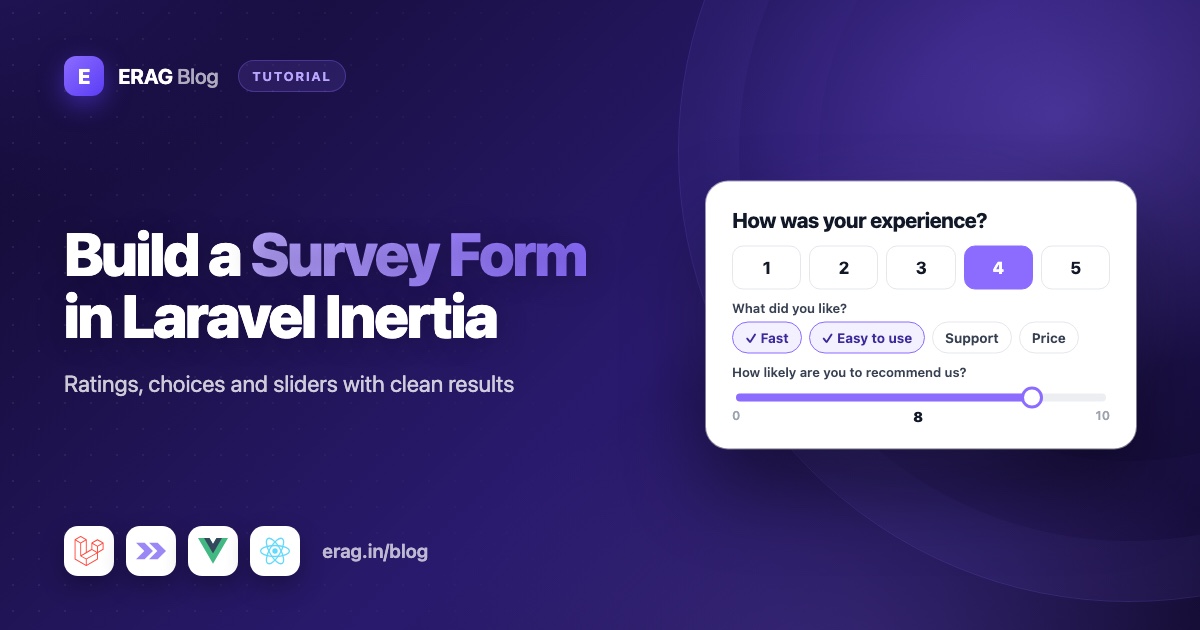
To build a Laravel survey form or feedback form, describe each question as a form field, validate the answers on the server, and save them to a survey_responses table with a unique user_id, so each person answers once. With Laravel Inertia Forms, a 1 to 5 rating is a Radio field with buttons(), multiple choice is a CheckboxGroup drawn as pills, a 0 to 10 "would you recommend us" score is a Slider, and comments go in a Textarea. Eloquent's avg(), count() and groupBy() then turn the answers into results and a Net Promoter Score (NPS).
This guide builds a short product feedback survey on Laravel 13 and Inertia v3, in Vue or React. It stores the answers, lets people update them, and shows a results page with averages, counts and NPS. The last part shows how to load the questions from the database, so admins can write their own surveys.
The short version
- Create a
survey_responsestable: one column per answer you want to report on, a JSON column for multiple choice, and a unique index onuser_id. - Build the survey in one form class:
Radiowithbuttons()for the rating,CheckboxGroupwithbuttons()for "what do you like",Sliderfrom 0 to 10, andTextareafor comments. - Ask a follow-up question only after a low rating with
visibleWhen('rating', '<=', 3). - Save with
updateOrCreate(['user_id' => ...], $answers), so a second submit updates the first answer. - Show results with
avg(),groupBy()counts andwhereJsonContains(). - Calculate NPS as the percentage of promoters minus the percentage of detractors.
- For surveys that admins write themselves, build the fields from question rows in the database.
The survey we're building
| Question | Field | Value sent | Stored as |
|---|---|---|---|
| How would you rate the app overall? | Radio with buttons() | A number from 1 to 5 | rating (tiny integer) |
| What should we fix first? (only after a 1 to 3 rating) | Textarea | Text | improve (text) |
| What do you like most? | CheckboxGroup with buttons() | An array like ['speed', 'design'] | liked (JSON) |
| How likely are you to recommend us? | Slider from 0 to 10 | A number | recommend_score (tiny integer) |
| What is the main reason for your score? | Textarea | Text | comments (text) |
How to store survey responses
You have two options. Each answer can get its own column, or all answers can go into one JSON column.
| A column per question | One JSON answers column | |
|---|---|---|
| Reports | Easy: avg(), where(), groupBy() | Harder: a JSON query per question |
| Changing questions | A migration per change | No migration |
| Best for | One survey you report on | Many surveys with changing questions |
This guide mixes both. Numbers you want to average get real columns, and the multiple choice list goes into a JSON column, because it is a list. Create the model and migration:
php artisan make:model SurveyResponse -m// database/migrations/xxxx_xx_xx_create_survey_responses_table.php
Schema::create('survey_responses', function (Blueprint $table) {
$table->id();
$table->foreignId('user_id')->constrained()->cascadeOnDelete();
$table->unsignedTinyInteger('rating');
$table->text('improve')->nullable();
$table->json('liked')->nullable();
$table->unsignedTinyInteger('recommend_score');
$table->text('comments')->nullable();
$table->timestamps();
$table->unique('user_id');
});<?php
namespace App\Models;
use Illuminate\Database\Eloquent\Attributes\Fillable;
use Illuminate\Database\Eloquent\Model;
#[Fillable(['user_id', 'rating', 'improve', 'liked', 'recommend_score', 'comments'])]
class SurveyResponse extends Model
{
/**
* @return array<string, string>
*/
protected function casts(): array
{
return [
'rating' => 'integer',
'liked' => 'array',
'recommend_score' => 'integer',
];
}
}The unique index on user_id is the real guarantee of "one response per user". Code can have bugs and two requests can arrive at the same moment, but the database refuses a second row for the same user.
How to build the survey form
Install Laravel Inertia Forms if you haven't. It needs Laravel 13 and Inertia v3:
composer require erag/inertia-forms
php artisan erag:install-inertia-forms
npm install @erag/inertia-forms-vue
Use @erag/inertia-forms-react for React, and add the Tailwind @source line from the installation guide. Then run php artisan make:form ProductSurveyForm:
<?php

namespace App\Forms;

use Erag\InertiaForms\Fields\CheckboxGroup;
use Erag\InertiaForms\Fields\Fieldset;
use Erag\InertiaForms\Fields\Radio;
use Erag\InertiaForms\Fields\Slider;
use Erag\InertiaForms\Fields\Submit;
use Erag\InertiaForms\Fields\Textarea;
use Erag\InertiaForms\Form;

class ProductSurveyForm extends Form
{
    public const LIKED_OPTIONS = [
        'speed' => 'Speed',
        'design' => 'Design',
        'reports' => 'Reports',
        'integrations' => 'Integrations',
        'support' => 'Support',
        'price' => 'Price',
    ];

    protected ?string $actionRoute = 'survey.store';

    public function fields(): array
    {
        $answered = $this->getModel() !== null;

        return [
            Fieldset::make('Your experience')->fields([
                Radio::make('rating')
                    ->label('How would you rate the app overall?')
                    ->options([1, 2, 3, 4, 5])
                    ->buttons()
                    ->required()
                    ->help('1 = poor, 5 = excellent'),

                Textarea::make('improve')
                    ->label('Sorry to hear that. What should we fix first?')
                    ->rows(3)
                    ->maxLength(1000)
                    ->visibleWhen('rating', '<=', 3)
                    ->clearWhenHidden(),

                CheckboxGroup::make('liked')
                    ->label('What do you like most?')
                    ->options(self::LIKED_OPTIONS)
                    ->buttons()
                    ->rule('max:3')
                    ->help('Pick up to three.'),
            ]),

            Fieldset::make('Would you recommend us?')->fields([
                Slider::make('recommend_score')
                    ->label('How likely are you to recommend us to a friend or colleague?')
                    ->min(0)
                    ->max(10)
                    ->required()
                    ->rule('integer')
                    ->help('0 = not at all likely, 10 = extremely likely'),

                Textarea::make('comments')
                    ->label('What is the main reason for your score?')
                    ->rows(4)
                    ->maxLength(2000)
                    ->showCharacterCount(),
            ]),

            Submit::make($answered ? 'Update my answers' : 'Send feedback')->processingLabel('Sending…'),
        ];
    }
}
Each field builds its own validation rules, so the class above is also your validation. Here is how each question works.
A 1 to 5 rating with Radio buttons
Radio with buttons() draws the options as one row of joined buttons, and the picked one fills with the accent color. It feels like a rating scale, but it is still a real radio group, so arrow keys, Tab and screen readers work as usual.
options([1, 2, 3, 4, 5]) is a plain list, so each value is also its label. The field generates an in rule for the five values, so nothing else gets through, and required() makes sure a rating is picked. The integer cast on the model keeps the stored rating a number when you read it back.
Multiple choice pills with CheckboxGroup
CheckboxGroup with buttons() draws each option as a pill that switches on and off. The value is an array of the picked keys, like ['speed', 'reports']. The field checks that every item is one of your options, and rule('max:3') limits the array to three items on the server. Without required(), picking nothing is fine and sends an empty array.
A 0 to 10 score with Slider
Slider renders a range input with the current number shown next to it. min(0) and max(10) set the range and generate numeric, min:0 and max:10 rules.
Two details matter for a score you will calculate with:
- A slider always has a value. Its empty value is the
min()value, so an untouched slider sends0. In NPS terms, that is an unhappy customer. step()is not checked on the server. A hand-made request could send7.5. Therule('integer')call blocks that.
Slider or 11 buttons?
If you need proof that the person actually picked a score, use a Radio instead. It starts empty, and required() forces a real choice:
Radio::make('recommend_score')
    ->label('How likely are you to recommend us to a friend or colleague?')
    ->options(range(0, 10))
    ->buttons()
    ->required(),
The row of 11 buttons wraps on narrow screens. Keep the slider when you prefer its look, and the buttons when you want a cleaner score. The stored value is the same number either way.
A follow-up question only for low ratings
The improve box uses visibleWhen('rating', '<=', 3). It appears the moment someone picks 1, 2 or 3, and stays hidden otherwise. Number comparisons only pass when both sides are numbers, so the box is also hidden while no rating is picked.
The same rule runs on the server. When the box is hidden, it gets no validation rules and is left out of validated(). clearWhenHidden() also empties it in the browser, so a typed answer doesn't linger after the rating goes up. The post on conditional fields in Laravel Inertia forms covers more patterns like this.
Comments with Textarea
The last question is a plain Textarea. maxLength(2000) adds a max:2000 rule and stops typing at the limit, and showCharacterCount() shows a live counter under the box.
How to allow one response per user
The controller shows the survey, filled in with any earlier answers, and saves new ones:
<?php

namespace App\Http\Controllers;

use App\Forms\ProductSurveyForm;
use App\Models\SurveyResponse;
use Erag\InertiaForms\Attributes\Validate;
use Illuminate\Http\RedirectResponse;
use Illuminate\Http\Request;
use Inertia\Inertia;
use Inertia\Response;

class SurveyController extends Controller
{
    public function show(Request $request): Response
    {
        $response = SurveyResponse::firstWhere('user_id', $request->user()->id);

        return Inertia::render('survey/Show', [
            'form' => ProductSurveyForm::make()->when(
                $response,
                fn (ProductSurveyForm $form, SurveyResponse $response) => $form->bind($response),
            ),
            'answered' => $response !== null,
        ]);
    }

    public function store(Request $request, #[Validate] ProductSurveyForm $form): RedirectResponse
    {
        SurveyResponse::updateOrCreate(
            ['user_id' => $request->user()->id],
            [
                ...$form->validated(),
                'improve' => $form->validated('improve'),
            ],
        );

        return to_route('survey.show');
    }
}
updateOrCreate() finds the user's row and updates it, or creates one. People can come back and change their answers, and the page shows "Update my answers" because a model is bound. When no row exists yet, Laravel tries the insert, and if the unique index rejects it because a parallel request got there first, it loads that row and updates it instead. Two quick submits can't create two rows or crash.
Look at the improve line. When the follow-up box is hidden, validated() leaves improve out. Without that line, someone who first rated 2 and later rated 5 would keep their old complaint in the database. Reading it with validated('improve') returns null when it is missing, so the old text is cleared.
Want one answer and no edits? Use firstOrCreate() instead. It only saves when the user has no row yet, and leaves an existing row alone.
Add the routes inside your signed-in group:
use App\Http\Controllers\SurveyController;

Route::middleware(['auth', 'verified'])->group(function () {
    Route::get('survey', [SurveyController::class, 'show'])->name('survey.show');
    Route::post('survey', [SurveyController::class, 'store'])->name('survey.store');
    Route::get('survey/results', [SurveyController::class, 'results'])
        ->middleware('can:view-survey-results')
        ->name('survey.results');
});
The survey page in Vue and React
<!-- resources/js/pages/survey/Show.vue -->
<script setup lang="ts">
import { Form, type FormSchema } from '@erag/inertia-forms-vue';

defineProps<{ form: FormSchema; answered: boolean }>();
</script>

<template>
    <div class="mx-auto max-w-2xl p-6">
        <h1 class="text-2xl font-semibold">How are we doing?</h1>
        <p class="mb-6 text-sm text-zinc-500">Four quick questions. Your answers help us decide what to build next.</p>

        <p v-if="answered" class="mb-6 rounded-lg bg-green-50 p-3 text-sm text-green-700">
            Thanks for your feedback! You can change your answers below at any time.
        </p>

        <Form :form="form" />
    </div>
</template>// resources/js/pages/survey/Show.tsx
import { Form, type FormSchema } from '@erag/inertia-forms-react';
export default function Show({ form, answered }: { form: FormSchema; answered: boolean }) {
return (
<div className="mx-auto max-w-2xl p-6">
<h1 className="text-2xl font-semibold">How are we doing?</h1>
<p className="mb-6 text-sm text-zinc-500">Four quick questions. Your answers help us decide what to build next.</p>
{answered && (
<p className="mb-6 rounded-lg bg-green-50 p-3 text-sm text-green-700">
Thanks for your feedback! You can change your answers below at any time.
</p>
)}
<Form form={form} />
</div>
);
}After a submit, the redirect reloads the page props, so answered turns true and the thank-you note appears above the saved answers.
How to calculate NPS in Laravel
NPS stands for Net Promoter Score. It comes from one question: "How likely are you to recommend us?", answered from 0 to 10. Each answer puts the person in one of three groups:
- Promoters (9 or 10): fans who are likely to recommend you.
- Passives (7 or 8): happy enough, but not excited.
- Detractors (0 to 6): unhappy customers.
The score is the percentage of promoters minus the percentage of detractors. Passives count toward the total but not toward either group. So the score runs from -100 (everyone is a detractor) to 100 (everyone is a promoter). For example, with 200 answers, 120 promoters (60%) and 30 detractors (15%), the NPS is 60 - 15 = 45.
Put the calculation on the model:
/**
 * @return array{score: int|null, promoters: int, passives: int, detractors: int}
 */
public static function netPromoterScore(): array
{
    $total = static::count();
    $promoters = static::where('recommend_score', '>=', 9)->count();
    $detractors = static::where('recommend_score', '<=', 6)->count();

    return [
        'score' => $total > 0 ? (int) round(($promoters - $detractors) / $total * 100) : null,
        'promoters' => $promoters,
        'passives' => $total - $promoters - $detractors,
        'detractors' => $detractors,
    ];
}
The score is null when nobody has answered, so the page can say "No responses yet" instead of showing a misleading 0.
How to show survey results
Add a results() method to the controller. Each number is one Eloquent aggregate query:
public function results(): Response
{
    return Inertia::render('survey/Results', [
        'total' => SurveyResponse::count(),
        'averageRating' => round((float) SurveyResponse::avg('rating'), 1),
        'ratingCounts' => SurveyResponse::query()
            ->selectRaw('rating, count(*) as total')
            ->groupBy('rating')
            ->orderBy('rating')
            ->pluck('total', 'rating'),
        'likedCounts' => collect(ProductSurveyForm::LIKED_OPTIONS)
            ->map(fn (string $label, string $value): array => [
                'label' => $label,
                'total' => SurveyResponse::whereJsonContains('liked', $value)->count(),
            ])
            ->values(),
        'nps' => SurveyResponse::netPromoterScore(),
    ]);
}avg('rating')returns the average rating, ornullwith no rows, so the cast tofloatkeeps it a number.groupBy('rating')counts how many people picked each rating, ready for a simple bar list.whereJsonContains('liked', 'speed')counts rows whoselikedarray includes that option. It works on MySQL, MariaDB, PostgreSQL and recent SQLite versions.LIKED_OPTIONSlives on the form class, so the form and the report never disagree about the options.
Protect the page with a Gate in AppServiceProvider, for example Gate::define('view-survey-results', fn (User $user): bool => (bool) $user->is_admin), using whatever role check your app has. A simple results page:
<!-- resources/js/pages/survey/Results.vue -->
<script setup lang="ts">
defineProps<{
    total: number;
    averageRating: number;
    ratingCounts: Record<string, number>;
    likedCounts: { label: string; total: number }[];
    nps: { score: number | null; promoters: number; passives: number; detractors: number };
}>();
</script>

<template>
    <div class="mx-auto max-w-2xl space-y-8 p-6">
        <h1 class="text-xl font-semibold">Survey results</h1>

        <p v-if="total === 0" class="text-zinc-500">No responses yet.</p>

        <template v-else>
            <div class="grid grid-cols-3 gap-4">
                <div class="rounded-xl border p-4">
                    <p class="text-sm text-zinc-500">Responses</p>
                    <p class="text-2xl font-semibold">{{ total }}</p>
                </div>
                <div class="rounded-xl border p-4">
                    <p class="text-sm text-zinc-500">Average rating</p>
                    <p class="text-2xl font-semibold">{{ averageRating }} / 5</p>
                </div>
                <div class="rounded-xl border p-4">
                    <p class="text-sm text-zinc-500">NPS</p>
                    <p class="text-2xl font-semibold">{{ nps.score }}</p>
                </div>
            </div>

            <ul class="space-y-1 text-sm">
                <li v-for="(count, rating) in ratingCounts" :key="rating">Rated {{ rating }}: {{ count }}</li>
            </ul>

            <ul class="space-y-1 text-sm">
                <li v-for="item in likedCounts" :key="item.label">{{ item.label }}: {{ item.total }}</li>
            </ul>
        </template>
    </div>
</template>
The React version takes the same props and maps over them the same way.
Test it with Pest
use App\Models\SurveyResponse;
use App\Models\User;

it('keeps one response per user and clears the hidden follow-up', function () {
    $user = User::factory()->create();

    $answers = [
        'rating' => 2,
        'improve' => 'Reports are slow.',
        'liked' => ['design'],
        'recommend_score' => 6,
    ];

    $this->actingAs($user)->post(route('survey.store'), $answers);
    $this->actingAs($user)
        ->post(route('survey.store'), [...$answers, 'rating' => 5, 'recommend_score' => 9])
        ->assertRedirect(route('survey.show'));

    $response = SurveyResponse::sole();

    expect($response->rating)->toBe(5)
        ->and($response->recommend_score)->toBe(9)
        ->and($response->improve)->toBeNull();
});

it('calculates the net promoter score', function () {
    foreach ([10, 9, 8, 3] as $score) {
        SurveyResponse::create([
            'user_id' => User::factory()->create()->id,
            'rating' => 4,
            'liked' => [],
            'recommend_score' => $score,
        ]);
    }

    expect(SurveyResponse::netPromoterScore())->toBe([
        'score' => 25,
        'promoters' => 2,
        'passives' => 1,
        'detractors' => 1,
    ]);
});
The first test sends the old follow-up text again with a rating of 5, the way a browser without clearWhenHidden() might. The server still treats the box as hidden and clears it. The second test checks the maths: 50% promoters minus 25% detractors gives 25.
Multi-page surveys
A long survey reads better as steps. Laravel Inertia Forms can show each fieldset as its own step with wizard(), checking every step on the server before moving on, and the controller above stays the same. The guide on multi-step form wizards in Laravel Inertia walks through it.
How to build a dynamic survey with questions from the database
The survey above is written in code, which is right for one survey you report on. When admins need to write their own surveys, store the questions as rows instead: a surveys table, a survey_questions table with type, label, options (JSON), required and position columns, and a survey_answers table with survey_id, user_id and a JSON answers column, plus a unique index on survey_id and user_id. The Survey model gets questions() and answers() hasMany relations, SurveyQuestion casts options to array and required to boolean, and SurveyAnswer casts answers to array.
A form class is plain PHP, so fields() can build one field per row. make() passes its arguments to the constructor, which is how the form knows which survey to load:
<?php

namespace App\Forms;

use App\Models\Survey;
use App\Models\SurveyQuestion;
use Erag\InertiaForms\Fields\CheckboxGroup;
use Erag\InertiaForms\Fields\Field;
use Erag\InertiaForms\Fields\Radio;
use Erag\InertiaForms\Fields\Submit;
use Erag\InertiaForms\Fields\Textarea;
use Erag\InertiaForms\Form;

class SurveyForm extends Form
{
    public function __construct(private Survey $survey) {}

    public function fields(): array
    {
        $questions = $this->survey->questions()->orderBy('position')->get();

        return [
            ...$questions->map(fn (SurveyQuestion $question): Field => $this->fieldFor($question))->all(),
            Submit::make('Send answers')->processingLabel('Sending…'),
        ];
    }

    private function fieldFor(SurveyQuestion $question): Field
    {
        $name = "answers.q{$question->id}";

        $field = match ($question->type) {
            'rating' => Radio::make($name)->options([1, 2, 3, 4, 5])->buttons(),
            'choice' => CheckboxGroup::make($name)->options($question->options ?? [])->buttons(),
            default => Textarea::make($name)->rows(3)->maxLength(2000),
        };

        return $field->label($question->label)->required($question->required);
    }
}
Each field is named answers.q12, where 12 is the question's id. Dot notation nests the values, so the validated data arrives as one answers array that fits straight into the JSON column. Every field still builds its own rules, so a rating only accepts 1 to 5 and a choice only accepts that question's options.
The controller passes the survey in and validates by hand:
public function show(Survey $survey): Response
{
    return Inertia::render('surveys/Show', [
        'title' => $survey->title,
        'form' => SurveyForm::make($survey)->route('surveys.answers.store', $survey),
    ]);
}

public function store(Request $request, Survey $survey): RedirectResponse
{
    $data = SurveyForm::make($survey)->validate($request);

    $survey->answers()->updateOrCreate(
        ['user_id' => $request->user()->id],
        ['answers' => $data['answers'] ?? []],
    );

    return back();
}
Skip #[Validate] here. It builds the form through Laravel's container, which doesn't know which survey you mean. Calling validate() on a form made with the right survey does.
The trade-off is reporting, as the storage table near the top of this guide shows. Answers live in JSON, so for a few thousand responses it's simplest to load them and use collection methods, like $survey->answers()->pluck('answers')->avg('q12') for an average rating.
Common problems and fixes
Many NPS answers are 0
Those are probably untouched sliders, because a slider sends its min() value until someone moves it. Switch to the Radio version with range(0, 10) and required(), so every score is a real choice.
An old follow-up answer stays after a better rating
Hidden fields are left out of validated(), so updateOrCreate() never touches that column. Set it on purpose with 'improve' => $form->validated('improve'), as in the controller above.
"The liked field must not have more than 3 items"
That is Laravel's default text for max:3 on an array. Add a messages() method to the form that returns ['liked.max' => 'Please pick up to three things.'].
Scores like 7.5 get saved
step() only affects the browser. Keep rule('integer') on the slider so the server rejects decimals.
"Duplicate entry" errors on user_id
Something calls create() directly. Use updateOrCreate() or firstOrCreate(), which handle the unique index for you.
Frequently asked questions
How do I create a survey form in Laravel?
Make a table for the answers, describe each question as a field in a form class, validate on submit, and save with updateOrCreate(). With Laravel Inertia Forms, the same class renders the survey in Vue, React or Svelte.
Should I store survey answers as JSON or in columns?
Use columns for answers you will average, filter or group, like ratings and scores. Use a JSON column for lists, like multiple choice, or when the questions change often.
How do I stop users from answering a survey twice?
Add a unique index on user_id and save with updateOrCreate() or firstOrCreate(). The index is the real guarantee, because it also covers double clicks and parallel requests.
How is NPS calculated?
Take the percentage of people who answered 9 or 10, and subtract the percentage who answered 0 to 6. People who answered 7 or 8 count toward the total only. The result runs from -100 to 100.
Can guests answer the survey without an account?
Yes, but you need another way to spot repeat answers, like a unique email column or a signed cookie. An IP address alone is a weak check, because many people can share one network.
Can I use star icons instead of number buttons?
Yes, with a custom field. The custom fields guide builds a star Rating field with its own PHP class and Vue, React or Svelte component.
How do I build a feedback form in Laravel Inertia without a login?
Use the same form class, remove the auth middleware, and save to a table without user_id. Add a rate limit with Laravel's throttle middleware to keep bots from flooding it. The Laravel contact form guide shows the rate limit and a honeypot field for public forms.
How do I let admins create their own survey questions?
Store each question as a row with a type, a label, options and a required flag, and pass the survey to the form class's constructor with SurveyForm::make($survey). In fields(), build one field per row, named like answers.q12, and save the validated answers array to a JSON column.
How do I export survey responses to CSV?
Return response()->streamDownload() from a controller and write a header row, then one row per response, with PHP's fputcsv(). Loop with lazy() so a large table isn't loaded into memory at once. Turn array columns like liked into text first, for example with implode(', ', $response->liked).
Start your survey
composer require erag/inertia-forms
php artisan erag:install-inertia-forms
npm install @erag/inertia-forms-vue- Radio: erag.in/laravel-inertia-forms/fields/radio.html
- Checkbox Group: erag.in/laravel-inertia-forms/fields/checkbox-group.html
- Slider: erag.in/laravel-inertia-forms/fields/slider.html
- Conditional visibility: erag.in/laravel-inertia-forms/concepts/visibility.html
- Form classes and constructor arguments: erag.in/laravel-inertia-forms/concepts/form-class.html
- GitHub: eramitgupta/laravel-Inertia-forms
- Related: new to form classes? Read building Inertia forms from a single PHP class.
