
orphan:installLaravel Orphan Files
Clean up the uploads your database forgot.
Replaced avatars, images from deleted posts and abandoned uploads stay on your disk and keep costing money. This package finds every file no database row points to and moves it to a trash folder you can restore from.
composer require erag/laravel-orphan-filesinstall$ php artisan orphan:scan
+------+-------+------------+---------+-------------+
| Disk | Files | Referenced | Orphans | Reclaimable |
+------+-------+------------+---------+-------------+
| s3 | 320 | 160 | 160 | 593.1 MB |
+------+-------+------------+---------+-------------+
WARN 160 orphaned files (593.1 MB) can be cleaned.
$ php artisan orphan:clean --force
INFO Moved to the trash: 160 files (593.1 MB).
Restore them with php artisan orphan:restore.
$ - Dry run first
- 24 h grace period
- Restorable trash
- Laravel 12 / 13
- PHP 8.2+
- Local disks
- Amazon S3
- MinIO
- RustFS
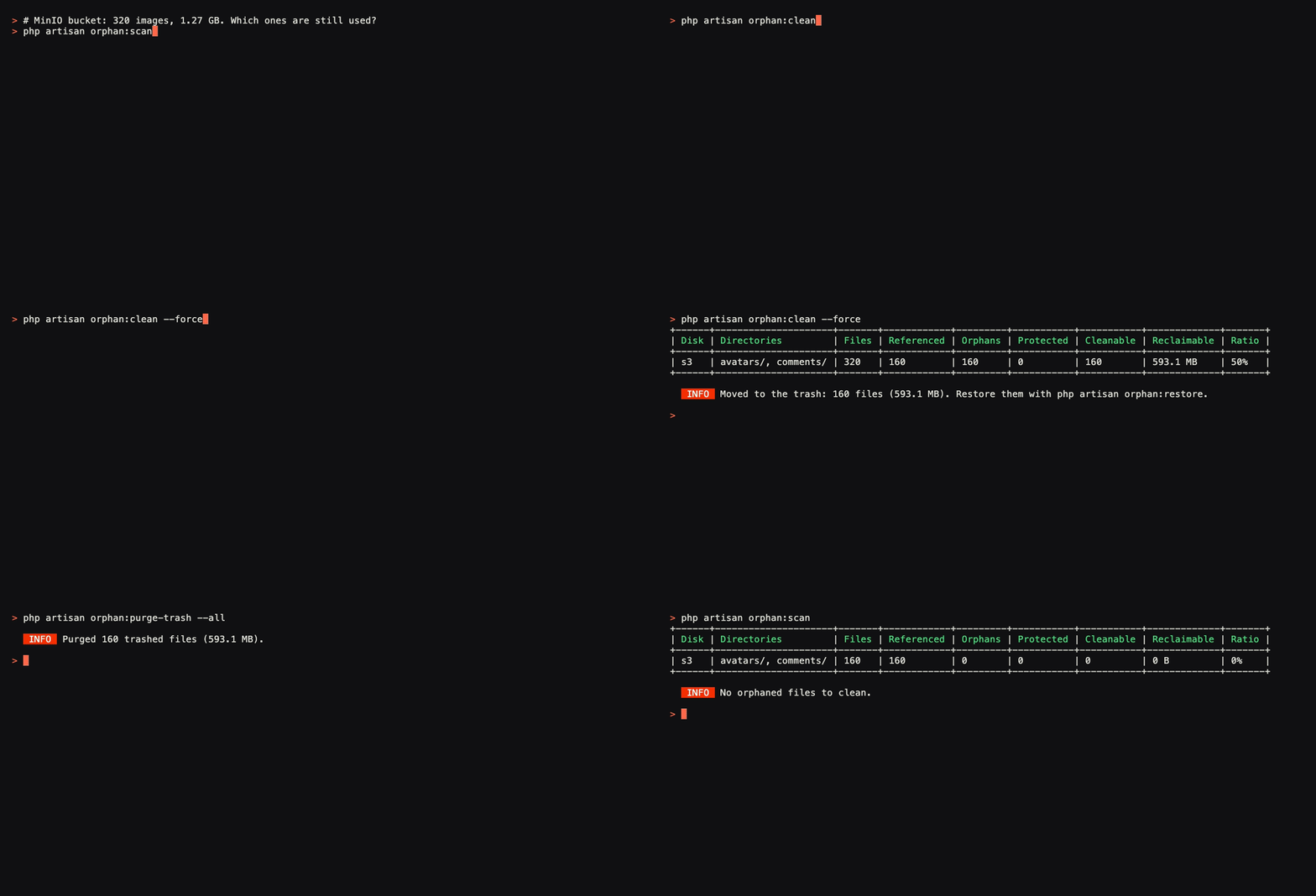
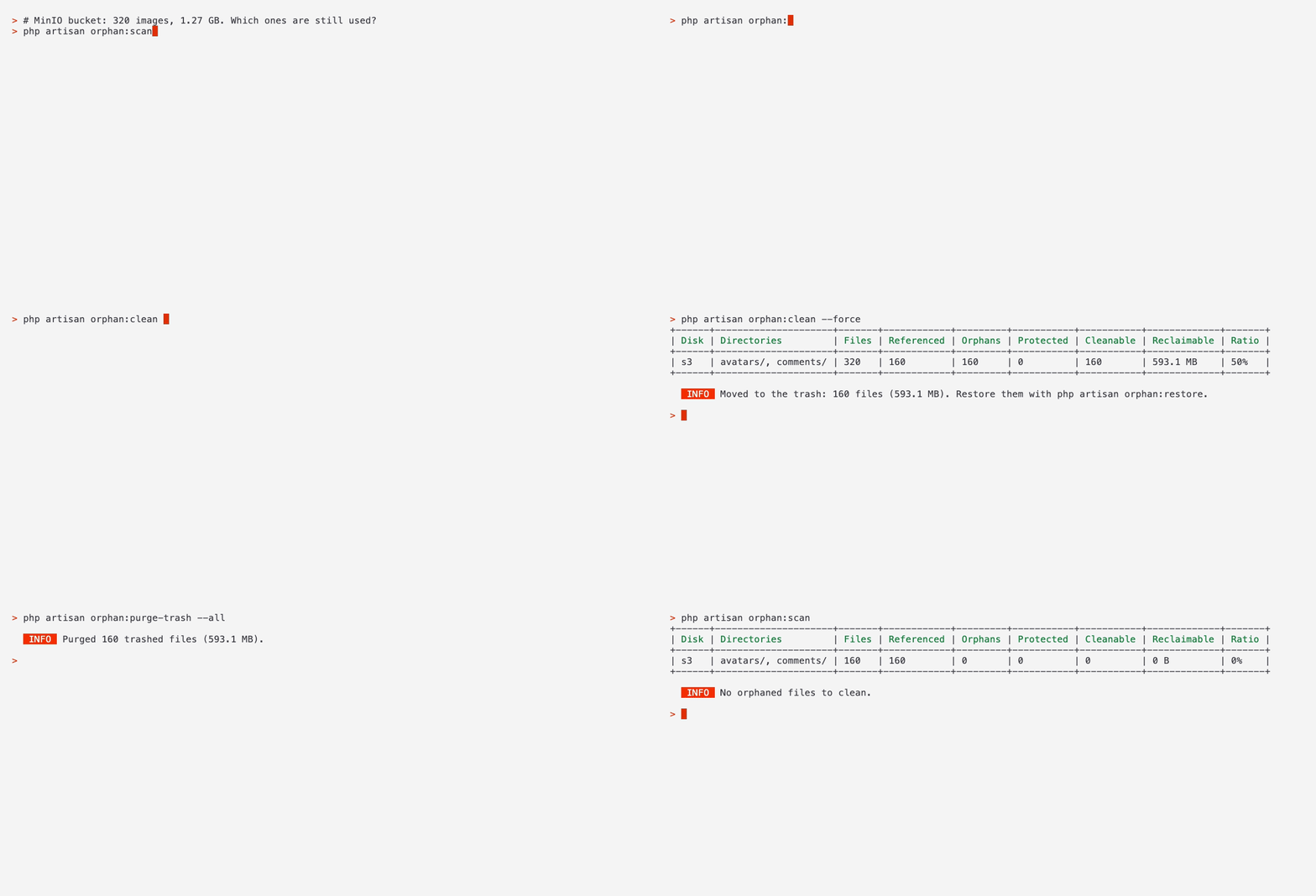
orphan:clean --force moves them to the trash, orphan:purge-trash --all deletes them, and the second scan finds nothing left. The problem
Every app with uploads leaks files
Laravel stores the file and your table stores its path. When the row changes or goes away, nothing removes the file. Over months these orphans add up to gigabytes you pay for and back up.
- 1
A user replaces their avatar
The row now points to the new file. The old one stays on the disk.
- 2
A post is deleted
The row is gone, but its cover and gallery images are still in storage.
- 3
An image is removed from rich text
The editor drops the img tag. The uploaded file is never cleaned up.
- 4
An upload is never saved
The file is stored before the form is submitted, and the form is abandoned.
- in use
avatars/jane-v2.jpgusers.avatar, row 12 - orphan
avatars/jane-v1.jpgreplaced by a new avatar - in use
posts/launch.jpgimg tag in posts.body, row 7 - orphan
posts/old-banner.jpgits post was deleted - in use
comments/a1.jpgcomments.images, row 31 - orphan
comments/tmp-4821.pngthe form was never saved
3 of 6 files have no row pointing at them. In the recording above it was 160 of 320 images on a MinIO bucket, or 593.1 MB.
How it works
Storage on one side, your database on the other
Each run compares the two from scratch. No table of its own, no listeners on your models, nothing stored between runs.
- 01
Read references
Reads every column you list as a source, 1,000 rows at a time, and keeps each file path as a hash.
- 02
List storage
Streams the file listing of each configured disk and folder, so a bucket with millions of objects is fine.
- 03
Compare
A file that no reference matches is an orphan, unless an exclusion, the grace period or a file rule keeps it.
- 04
Report or trash
A scan only reports. A clean previews the list, and with --force moves the files to .orphan-trash/.
Where paths live
It reads file paths the way your app stores them
Plain paths, JSON arrays, rich text and full URLs. Pick a column type to see what goes in the config and which files it keeps.
- In your databaseusers.avatar
avatars/jane-v2.jpg
- In the configconfig/orphan-files.php
['table' => 'users', 'column' => 'avatar', 'type' => 'path', 'disk' => 'public']
- Files it keeps
avatars/jane-v2.jpg
Safe by default
Built so one wrong setting can't empty a bucket
Deleting files is the risky part, so every default leans towards keeping a file. And when a file does move, it can still come back.
- Dry run
Preview by default
orphan:clean without --force lists every file it would move and changes nothing.
- Trash
Undo any clean
Files move to .orphan-trash/ on the same disk. orphan:restore puts them back at their old path.
- 24 h
Grace period
Files changed in the 24 hours before the database was read are skipped, so fresh uploads are safe.
- 90%
Safety limit
A clean stops if more than 90% of a disk would go. That almost always means a source is missing.
- 30 days
Trash retention
orphan:purge-trash only deletes trashed files older than 30 days. You choose when it runs.
- Read-only
Your tables stay as they are
Rows are only read, from the primary connection. Soft-deleted rows still keep their files.
- Fails early
Config is checked first
A table or column that does not exist stops the run before a single file is touched.
- Any host
Unlisted CDNs still protect
A URL on a host you never configured still keeps the file whose path it ends with.
Why a package
A quick script finds the easy cases
Comparing one column with one folder takes ten lines. The cases that delete live files are the ones you only find later.
Also included
The details real apps need
Every app stores files a little differently. These cover the setups that usually break a simple cleanup.
exclude_patternsExclusions and globsPaths and patterns like defaults/* or *.pdf are never cleaned.only_extensionsSize and type rulesOnly clean files within a size range, or with the extensions you pick.FileFilterCustom filtersYour own FileFilter class can return a reason to keep any file.extractorsCustom source typesAdd an extractor for a format your app invented, next to path, json, html and url.normalizersNormalizersTeach it another way your app writes paths. They can only add files to keep.prefixScoped and prefixed disksA disk's root and a scoped disk's prefix are used when matching URLs and deleting.case_sensitiveCase-insensitive storageSet case_sensitive to false for macOS volumes or a case-insensitive MySQL collation.trash.diskTrash on another diskPoint trash.disk at a separate disk, and set how many days the trash is kept.--dateRestore by path or dateBring back one file, a whole folder, or only the copy trashed on a given day.--mode=deleteDelete modeSkip the trash with --mode=delete. S3 objects are removed 1,000 keys per request.OrphanFiles::Facade and eventsCall scan, clean and explain from PHP, and listen for trashed or deleted files.explainSpot broken referencesorphan:explain also tells you when a row points to a file that is missing from the disk.
Six commands
Everything runs from Artisan
No web UI, no migrations. Pick a command to see what it prints on the demo app.
$ php artisan orphan:install
   INFO  Published config/orphan-files.php.

  Next steps
  1. In config/orphan-files.php, list your upload folders under 'disks' and the columns that store file paths under 'sources'.
  2. Run php artisan orphan:scan to see how many orphaned files you have.
  3. Run php artisan orphan:clean for a dry run, then php artisan orphan:clean --force to move the orphans to the trash.

  Docs: https://erag.in/laravel-orphan-files/
Large buckets
Made for millions of files
Tables are read in chunks and storage listings are streamed, so memory stays flat as your storage grows.
- 1,000
- rows per database chunk, read by primary key
- ~25 MB
- of memory for 250,000 referenced paths, measured on PHP 8.4
- Temp table
- takes over past 250,000 references, and is dropped after the run
- 1,000
- keys per S3 delete request. Trash mode moves files inside the bucket
Automate it
Put it on the scheduler
Scan weekly, clean on a quiet night, and empty old trash every day.
Schedule::command('orphan:scan --json')->weekly();

Schedule::command('orphan:clean --force')
    ->weekly()->sundays()->at('03:00')
    ->withoutOverlapping();

Schedule::command('orphan:purge-trash')->daily();
--queuerun a scan or clean as a queued job--jsonprint the scan summary for scripts and alerts--export=csvwrite every orphan to a CSV file--older-than=7dreplace the grace period for one run
Events for alerts: OrphanScanCompleted, OrphanFilesTrashed and OrphanFilesDeleted. Prefer PHP? Call it from code.
Laravel Boost + AI agents
Your AI agent knows the safe path
The package ships a Laravel Boost guideline and an orphan-files-setup skill. After php artisan boost:install, agents like Claude Code, Cursor or Copilot set it up the way the docs describe instead of guessing.
A setup skill
Installing, writing the config, listing every column that stores files, the first scan, checking files with explain, and scheduling.
Guardrails in the guideline
Agents preview with a scan or a dry run, and ask you before using --force, delete mode or --force-ratio.
Clean up the unused uploads in our MinIO bucket.
I ran php artisan orphan:scan: 160 of 320 files are orphans, 593.1 MB in total.
The dry run with orphan:clean lists them all. Nothing has changed yet.
orphan:clean --force moves them to .orphan-trash/, where you can restore them. Should I run it?
Questions
What people ask before the first clean
Is it safe to run on production?
By default it only reports. A clean needs --force and moves files to a trash folder you can restore from. Files changed in the last 24 hours are skipped, and a run stops if more than 90% of a disk would go. Start with a scan and check a few files with orphan:explain.
Does it change my database?
No. It only reads your tables. Very large runs create one temporary table, which is dropped at the end. Set diff.driver to memory if you would rather avoid it.
Does it load the whole table or bucket into memory?
No. Tables are read 1,000 rows at a time and storage listings are streamed. Referenced paths are kept as hashes, about 25 MB for 250,000 of them, and move to a temporary table past diff.memory_limit.
Does saving or deleting a model remove files?
No. The HasStorageFiles trait only declares which columns hold files. Files are only removed when you run orphan:clean --force.
Do soft-deleted rows keep their files?
Yes. Global scopes are ignored, so a soft-deleted row still counts as a reference. Restoring the row should bring its file back too.
How are S3 files removed?
Trash mode moves them inside the bucket, so they never leave S3. Delete mode uses DeleteObjects with up to 1,000 keys per request.
Where does the trash live?
In .orphan-trash/{disk}/{date}/{original path}, on the same disk or on the disk you set as trash.disk. Scans never look inside it, and orphan:purge-trash empties it after 30 days.
Which Laravel and PHP versions are supported?
Laravel 12 on PHP 8.2 or newer, and Laravel 13 on PHP 8.3 or newer. S3, MinIO and RustFS disks also need league/flysystem-aws-s3-v3.
Something else? Read the full FAQ, the troubleshooting guide, or open an issue.
Get started
See what your app is storing for nothing
- Install the package, then run orphan:install to create the config.
- List your upload folders and the columns that store paths.
- Run a scan. Nothing changes until you add --force.
$ composer require erag/laravel-orphan-files$ php artisan orphan:install # creates config/orphan-files.php$ php artisan orphan:scan # read-only, changes nothingLaravel 12 on PHP 8.2+, or Laravel 13 on PHP 8.3+. S3, MinIO and RustFS also need league/flysystem-aws-s3-v3.